

Appearance
Client settings
Various settings can be configured via the Portal interface.
INFO
You will need "Update config" permissions in order to access these pages.
Client configuration can also be read and updated through the public API. The API only exposes settings for the authenticated client. For the document expiration settings, the response also includes the platform default as defaultValue when available; this does not create a client override.
| Endpoint | Method | Description |
|---|---|---|
/api/client/config | GET | Returns the configured values for the authenticated client. |
/api/client/config/{key} | GET | Returns one configured value. |
/api/client/config | PUT | Updates one or more client settings. |
/api/client/config | DELETE | Removes one or more client overrides. |
For example, update the document expiry settings with:
json
{
  "document-age-threshold": "90",
  "expiration-alert-lead-time": "30"
}
Values are supplied as strings. The expiry settings must be positive whole numbers of calendar days. To restore a setting to the platform default, remove the client override:
json
["expiration-alert-lead-time"]The update and delete endpoints require the appropriate client configuration permission.
General Settings
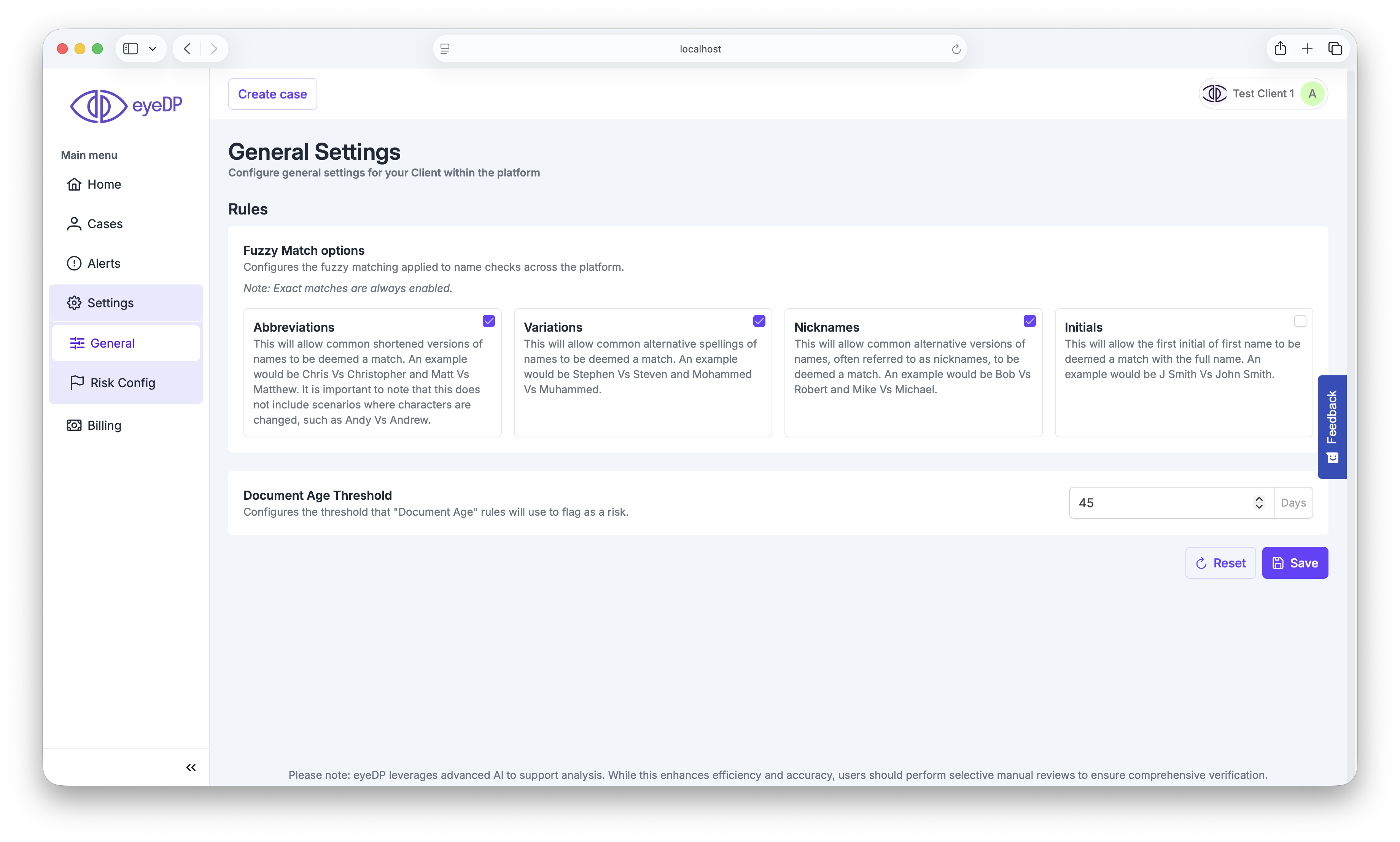
Rules settings:
Fuzzy matching
Controls fuzzy matching levels for name checks across the platform. For example: "Name on document vs name on case". Enable which options you want to accept as a match from this screen.
INFO
If no fuzzy options are enabled, then exact matches will be used.
| Level | Description |
|---|---|
| Abbreviations | This will allow common shortened versions of names to be deemed a match. An example would be Chris Vs Christopher and Matt Vs Matthew. It is important to note that this does not include scenarios where characters are changed, such as Andy Vs Andrew. |
| Variations | This will allow common alternative spellings of names to be deemed a match. An example would be Stephen Vs Steven and Mohammed Vs Muhammed. |
| Nicknames | This will allow common alternative versions of names, often referred to as nicknames, to be deemed a match. An example would be Bob Vs Robert and Mike Vs Michael. |
| Initials | This will allow the first initial of first name to be deemed a match with the full name. An example would be J Smith Vs John Smith. |
INFO
The result will be considered an overall match if at least 1 of your selected options matches. For example, if you enable Abbreviations and Initials but only Initials matches, the overall result will still be a match.
Ignore Diactritics
Ignore diacritics when matching names across the platform. This will apply to all enabled "Fuzzy Match Options" above, including "exact".
INFO
Leaving this option blank will use the platform default of false.
Allow Reversed Names
If enabled, name checks will allow forename/surnames to be reversed. E.g. when enabled, "James Smith" will match "Smith James".
INFO
Leaving this option blank will use the platform default of false.
Document Age Threshold
Controls the age threshold for the "Document age" rule. Documents older than this value will flag.
INFO
Leaving this option blank will use the platform default option of 90
Expiration Alert Lead Time
Controls how many calendar days before a document reaches its effective expiry date the "Document Expiring" risk is raised. This applies to both expiry-date-based and issue-date-based document types.
INFO
Leaving this option blank will use the platform default option of 30 days.
Address Match Fields
Configures which fields must match when performing address checks on split addresses across the platform.
| Option | Description |
|---|---|
| All | Requires all present fields match. Missing fields on either side are ignored. |
| House Name / Number + Postcode | Requres House Name OR House Number, AND Postcode. Other fields are ignored. |
INFO
Leaving this option blank will use the platform default option of All
Combined Address Match Fields
Configures which fields must match when performing address checks on combined addresses across the platform.
| Option | Description |
|---|---|
| All | Requires all present fields match. Missing fields on either side are ignored. |
| House Name / Number + Postcode | Requres House Name OR House Number, AND Postcode. Other fields are ignored. |
INFO
Leaving this option blank will use the platform default option of House Name / Number + Postcode
Combined Address Services
Some services and checks require a split address in order to run. When a case is created with a combined address, we will try to split it into its individual components. You can control whether we attempt to run these services with the automatically split address.
Document Extraction
Proof of Address Page Count
Number of pages to process when performing a proof of address extraction.
INFO
Leaving this option blank will use the platform default option of 1
Proof of Address Trim to Page Count
If enabled, any additional pages above the "Proof of Address Page Count" will be stripped from the document and will not be saved nor viewable in the portal. The original document will still be sent for Tamper Detection.
INFO
Leaving this option blank will use the platform default option of false
Proof of Address Process Bank Statements
If enabled, bank statements will still be processed as a bank statement when flagged as POA, extracting transactions, and triggering downstream rules, etc.
Note: Enabling this option, but disabling "Trim to Proof of Address Page Count" will result in the POA bank statements being processed as normal.
INFO
Leaving this option blank will use the platform default option of true
Tamper Detection Settings
These settings only have an effect when both Tamper Detection and Tamper Lite are enabled for your account. The Portal only shows them in that case.
When Tamper Lite Raises a Risk
Controls whether Tamper Detection still runs on a document where Tamper Lite has raised a risk. Through the API, this is the tamper-detection-on-tamper-lite-risk setting.
Tamper Lite raises a risk on a document when any of its checks is Flagged, whatever rating you've given that risk. A check whose risk is disabled in your risk configuration doesn't run, so it can't cause Tamper Detection to be skipped.
The setting is read when a document is uploaded, so changing it only affects documents uploaded afterwards. Documents already uploaded follow the setting that applied when they were uploaded.
| Option | Value | Description |
|---|---|---|
| Run Tamper Detection | run | Tamper Detection and Tamper Lite both run on every document, independently of each other. |
| Skip Tamper Detection | skip | Tamper Lite runs first. Where it raises a risk on a document, Tamper Detection is skipped for that document and shown as Skipped. Otherwise Tamper Detection runs. |
json
{
  "tamper-detection-on-tamper-lite-risk": "skip"
}
INFO
Leaving this option blank or setting any value other than "skip" or "run" will use the platform default option of Run Tamper Detection (run)
WARNING
If you choose skip and integrate through the API, make sure your integration handles the Skipped asset run state in case progress. If you use webhooks to know when Tamper Detection has finished, also register for tamper-detection/skipped: no tamper-detection/completed event is sent for a skipped file.
KYC Settings
Stricter 1 + 1
Require DOB (in addition to address) match to qualify for 1+1.
INFO
Leaving this option blank will use the platform default option of false
Document Translation
Enable Translations
Enable translation features for detected non-English extracted fields.
INFO
Leaving this option blank will use the platform default option of false
Auto Translate
Automatically translate detected non-English fields when available. Only applies to Portal translations, API always translates.
INFO
This option can only be enabled if "Enable Translations" is also enabled.
INFO
Leaving this option blank will use the platform default option of false.
AML Settings
DOB Suppression
Ignore AML matches without a DOB.
INFO
Leaving this option blank will use the platform default option of false
ADV Settings
Primary colour
Sets the primary colour for the buttons and controls within the ADV integration (if enabled). The default is #6940ff.
Save Document
If enabled, documents uploaded during an ADV session are saved as Case Documents for further processing.
INFO
Leaving this option blank will use the platform default option of true.
Default Liveness Check
Sets the default liveness check when requesting a session.
INFO
Leaving this option blank will use the platform default option of passive.