

Appearance
Documents
Endpoints for interacting with documents
Limits
These are the limits for documents in the EyeDP platform.
Accepted document types
BankStatement, Passport, DrivingLicence, Payslip, UtilityBill and Other
Use Other for any document that isn't one of the specific types, such as a residence certificate or company registration. See Other documents for what is extracted from them.
File limits
Files have a size limit of 15MB and must be one of jpg / jpeg, png, or pdf.
Auto-Detect
Auto detect will attempt to find the file type from our predefined list of supported files automatically.
If auto detect is true you do not need to supply a document type.
If auto detect is false or omitted, document type must be supplied. Omitting it is not the same as setting it to false: on some endpoints, auto detect still runs on a document whose autoDetect is omitted.
Whether a document type you supply is kept depends on the endpoint:
| Endpoint | Auto detect true or omitted | Auto detect false |
|---|---|---|
| Upload documents and Create case | The detected type replaces the type you supplied | The type you supplied is used |
| Upload documents and Create Case | The type you supplied is used. Auto detect may still run to work out the case type | The type you supplied is used |
To upload a document as Other, set type to Other and autoDetect to false. This works on every upload endpoint.
If rejectAllIfAutoDetectFailure is true, all file uploads on the request will fail if one fails. If it is false or null, files that fail type detection will be set to "other" with their IDs returned in the response.
This flag is only on document upload requests. Create case uses a different field, stopCaseCreateIfAutoDetectFails — they are not interchangeable.
If the files grouped in one document are detected as different types, that document isn't uploaded. Its files are returned as failures with the conflicting types.
Bank statements still need to be PDF's, if auto detect finds a bank statement and the file is not PDF it will be rejected.
Upload documents
Upload documents to an existing case. The case id is in the path.
INFO
Like creating a case this endpoint receives a form data payload. It makes it easy to upload multiple documents at once but can be tricky to get going. You will need to check how to upload form data arrays in your chosen implementation.
| Endpoint | /api/cases/{caseId}/documents |
|---|---|
| Method | POST |
| Content type | multipart/form-data |
Request
| Field | Description | Required | Limits |
|---|---|---|---|
| documents[0].type | Type of the document | Optional | See the limits section. Required if autoDetect is false |
| documents[0].files | File of the document | Yes | See the limits section |
| documents[0].autoDetect | Boolean, Auto-Detect document type | Optional | See the auto-detect section |
| documents[0].isPoaOnly | Boolean, perform a Proof of Address Only extraction | Optional | See the POA only section |
| documents[0].category1 | Category 1 hint for extraction (for bank statements, the institution) | Optional | |
| documents[0].country | Country hint for extraction (ISO 2-letter code) | Optional | |
| documents[0].language | Language hint for extraction | Optional | |
| rejectAllIfAutoDetectFailure | Boolean, reject the request if any fail auto-detection rather than classifying as "other" | Optional - Defaults to false | Not the same as stopCaseCreateIfAutoDetectFails on create case |
Uploading documents in Postman:
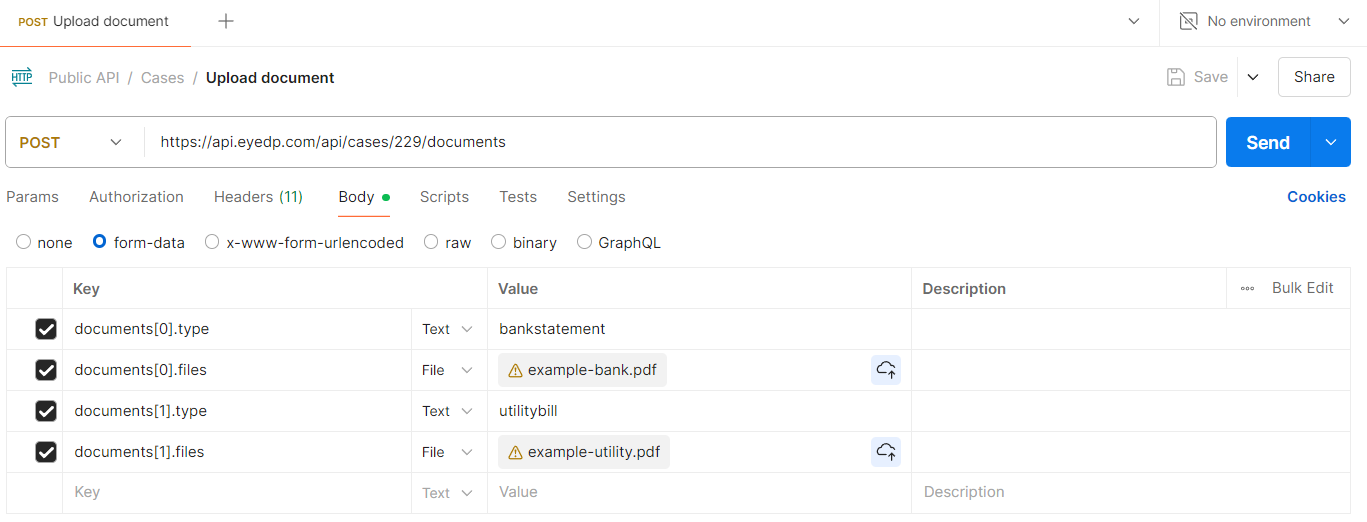
Response
The response contains the ids of the successful uploaded documents. Along with any auto-detection failure reasons.
json
{
    "successDocumentIds": [
        1485
    ],
    "failureDocuments": [
        {
            "fileName": "example-bank.pdf",
            "error": "Unable to auto-detect document type."
        }
    ]
}
Upload documents and Create Case
Upload documents and create a case from the extracted data.
INFO
Like creating a case this endpoint receives a form data payload. It makes it easy to upload multiple documents at once but can be tricky to get going. You will need to check how to upload form data arrays in your chosen implementation.
| Endpoint | /api/documents |
|---|---|
| Method | POST |
| Content type | multipart/form-data |
Case Type
In order to create a case from a document extraction, we need to know whether the case belongs to a Person or an Entity.
You can specify a caseType in the payload and we'll use that. If caseType is omitted but you have specified the document type when uploading a document, we'll try to infer from that: E.g. If you upload a Passport, we know the case type is Person. If you don't specify the types at all, or we can't tell from the types you've provided, we'll try to detect it ourselves.
Business vs Charity is a separate field, EntityTypeId, on the case object — not caseType.
Unconfirmed Case Type
Should the Case Type detection process fail to identify, the case will be set to Person and a IsCaseTypeUnconfirmed flag will be set. Whilst in this state, only a select few checks can run. The type can either be confirmed, or the case can be deleted. You can also perform these actions in the portal.
Request
| Field | Description | Required | Limits |
|---|---|---|---|
| caseType | Type of the case | Optional | Must be either: 1 for Person or 2 for Entity |
| documents[0].type | Type of the document | Optional | See the limits section. Required if autoDetect is false |
| documents[0].files | File of the document | Yes | See the limits section |
| documents[0].autoDetect | Boolean, Auto-Detect document type | Optional | See the auto-detect section |
| documents[0].isPoaOnly | Boolean, perform a Proof of Address Only extraction | Optional | See the POA only section |
| documents[0].category1 | Category 1 hint for extraction (for bank statements, the institution) | Optional | |
| documents[0].country | Country hint for extraction (ISO 2-letter code) | Optional | |
| documents[0].language | Language hint for extraction | Optional | |
| rejectAllIfAutoDetectFailure | Boolean, reject the request if any fail auto-detection rather than classifying as "other" | Optional - Defaults to false | Not the same as stopCaseCreateIfAutoDetectFails on create case |
Uploading documents in Postman:
Response
The response contains the ids of the successful uploaded documents. Along with any auto-detection failure reasons.
json
{
    "successDocumentIds": [
        1485
    ],
    "failureDocuments": [
        {
            "fileName": "example-bank.pdf",
            "error": "Unable to auto-detect document type."
        }
    ]
}
Proof Of Address Only (POA Only)
Certain documents support being processed as "Proof of Address" only. These documents will only have the name and address information extracted and will be tagged in the portal.
Supported Types
The following document types support POA only extractions:
- Driving Licence
- Bank Statement
- Utility Bill
- Payslip
The "other" document type does not support POA only extractions.
Configuration
POA has various settings that can be altered in Client Configuration, altering the behaviour.
Get document
Gets a document based on it's id. The response includes the extracted information of the document.
| Endpoint | /api/cases/{caseId}/documents/{documentId} |
|---|---|
| Method | GET |
Response example
Response of a document while content extraction is in progress
json
{
    "id": 123,
    "name": "Bank Statement #1",
    "documentType": "BankStatement",
    "extractionStatus": "Pending",
    "summary":"The **Bank Statement #1** for the case involving **Frank Tank** is currently undergoing both **tamper detection** and **content validation** checks, which are still in progress. Additionally, the **IDV** check has not been run yet. As a result, there are no risks generated at this time, leaving a gap in the risk assessment for this document.\n\nThe document is currently undergoing extraction, and the relevant information will be accessible soon. Please hold on as we finalize the details to ensure a comprehensive summary. Your patience is appreciated, and we will provide the necessary insights as soon as they become available.",
    "extract": {}
}
Response of a document when content extraction has finished
json
{
    "id": 123,
    "name": "Bank Statement #1",
    "documentType": "BankStatement",
    "extractionStatus": "Completed",
    "extract": {
        "bankStatement": {
            "fullName": "James Smith",
            "fullAddress": "12 Golf Road, Cardiff, 123 123, GB",
            "address1": "12",
            "address4": "Golf Road",
            "address6": "Cardiff",
            "postcode": "123 123",
            "country": "GB",
            "periodStartDate": "2025-02-01T00:00:00",
            "periodEndDate": "2025-02-28T00:00:00",
            "openingBalance": 731.62,
            "closingBalance": 1392.29,
            "hasOverdraft": false,
            "bankName": "Monzo",
            "accountNumber": "99999999",
            "sortCode": "00-00-00",
            "currency": "GBP",
            "dailyBalances": [
                {
                    "date": "2025-02-01T00:00:00",
                    "low": 731.62,
                    "high": 853.50
                }
            ],
            "transactions": [
                {
                    "date": "2025-02-21T00:00:00",
                    "amount": -19.00,
                    "description": "Netflix subscription",
                    "category": "Entertainment",
                    "balance": 1313.72
                }
            ]
        }
    }
}
Delete document
Deletes a document from the case.
| Endpoint | /api/cases/{caseId}/documents/{documentId} |
|---|---|
| Method | DELETE |